| RU | Home | Tags | About | Contact | RSS |
In Hack We Trust
Tags on site: 9
Updated: 22.10.2026
QR phishing: how "quishing" works and how not to fall for it
POST Author: ghcpin | 20.10.2026 | 190 words, ~1 min
A QR code is just a URL a human can’t read with their eyes. That’s exactly why attackers love it: mail filters check links in text, but don’t always recognize a picture.
Typical scenarios
- An “update your MFA” email with a QR code instead of a link. The code leads to a fake login page.
- A sticker over the real code on a parking meter or a café table.
- A PDF attachment with a code: it slips past some attachment scanners.
How to defend
- Before opening, look at the domain your phone camera shows. Try it on the code below: the camera should show
ghcp.in— this very site. - Don’t enter a password on a page opened from a QR code. Open the service manually instead.
- Use FIDO2 keys / passkeys: they can’t be “handed over” to a phishing site.
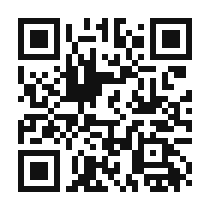
Fig. 1. A harmless QR code: it leads to this article. Check what domain your camera shows before tapping.
Simple rule: a QR code is a link from a stranger. Treat it like one.
Tags: phishing, social engineering
| « Nmap cheat sheet for beginners | SE. Fundamental » |
New on site
- SE. Fundamental
22.10.2026 - QR phishing: how "quishing" works and how not to fall for it
20.10.2026 - Nmap cheat sheet for beginners
12.10.2026 - Storing passwords in 2026: bcrypt, scrypt or Argon2
28.09.2026
Terminal

Find me
Telegramchannel / DMHack The Boxmy profile[matrix]chat with me𝕏follow me

Put our button on your site: select the code (Ctrl+A) and copy it (Ctrl+C).